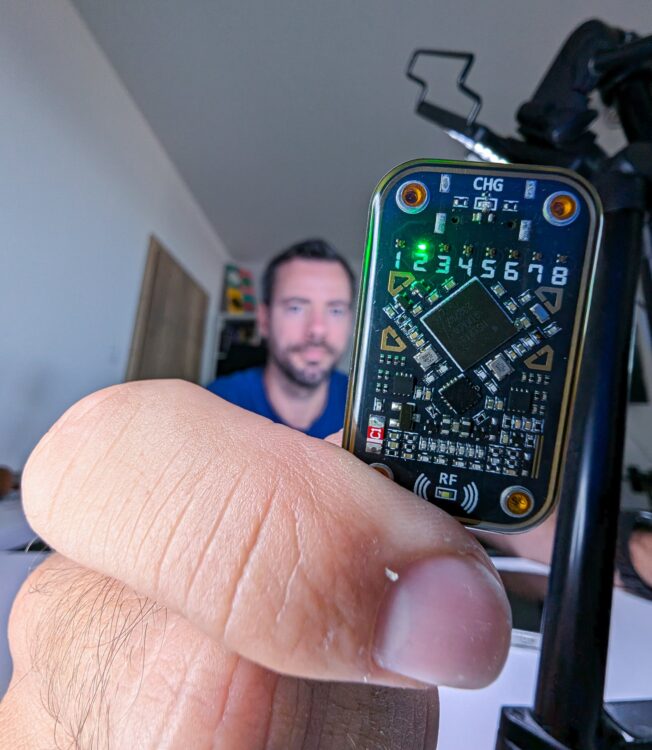
Contactless cards and key fobs are now part of everyday life. They unlock apartment buildings, identify employees, open hotel rooms, record attendance and interact with electronic locks. Although many of these credentials look similar from the outside, the technology inside them can be very different.
The Chameleon Ultra is a compact, open-source RFID and NFC research device. It can identify and read supported contactless tokens, save their information, emulate selected cards and, in some cases, write compatible information to a suitable blank card or key fob. It supports both common 125 kHz low-frequency RFID technologies and selected 13.56 MHz high-frequency NFC/RFID technologies.
In simple terms, it is a portable tool for learning how contactless credentials work and for testing systems that you own or are explicitly authorized to assess.
Important legal and ethical disclaimer
Chameleon Ultra is a legitimate research and testing tool, but using it without authorization may be illegal.
Do not use it to copy another person’s access badge, enter a building without permission, bypass payment or ticketing systems, interfere with public transport credentials, or test production access-control systems without authorization.
What is Chameleon Ultra?
The Chameleon Ultra is a pocket-sized device focused primarily on RFID and NFC credentials. It can operate in two basic roles:
- Reader mode: The Chameleon communicates with a physical card or key fob and attempts to identify or read it.
- Emulator mode: The Chameleon behaves like a supported contactless card when presented to a compatible reader.
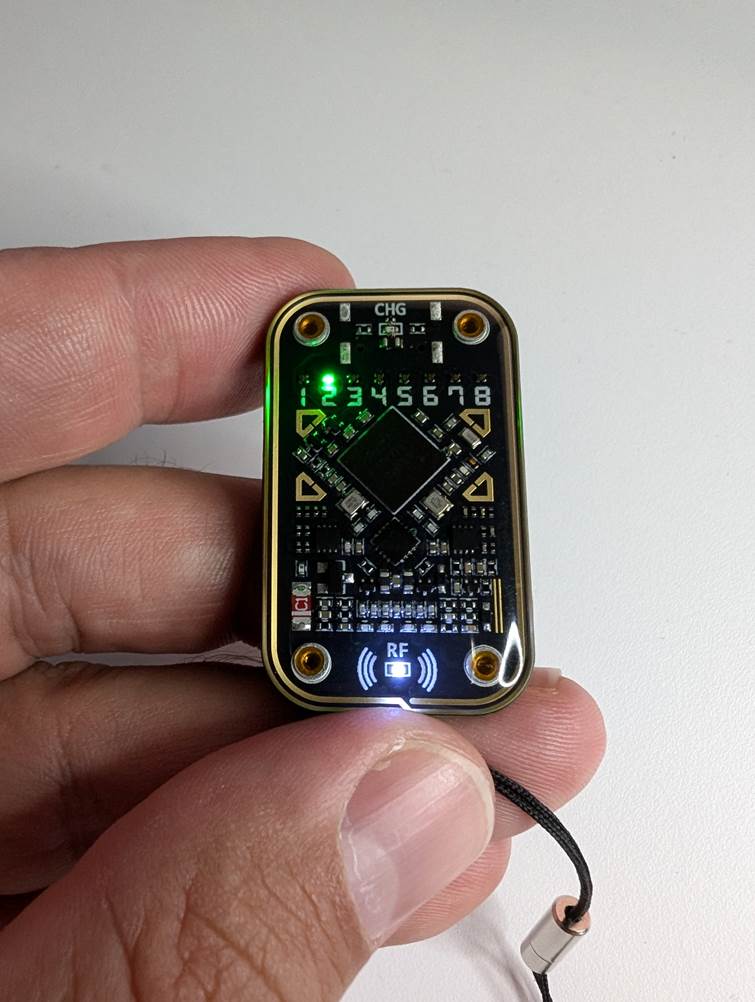
It connects to a computer or mobile device through USB-C or Bluetooth Low Energy, and its eight internal slots allow multiple supported credential profiles to be stored.
Unlike a normal USB card reader, the Chameleon Ultra is designed to be carried and used as a standalone emulator after a supported profile has been loaded into one of its slots.
Who is it for?
The Chameleon Ultra is not just for cybersecurity experts. It is also a handy learning tool for anyone curious about the contactless cards and key fobs they use every day.
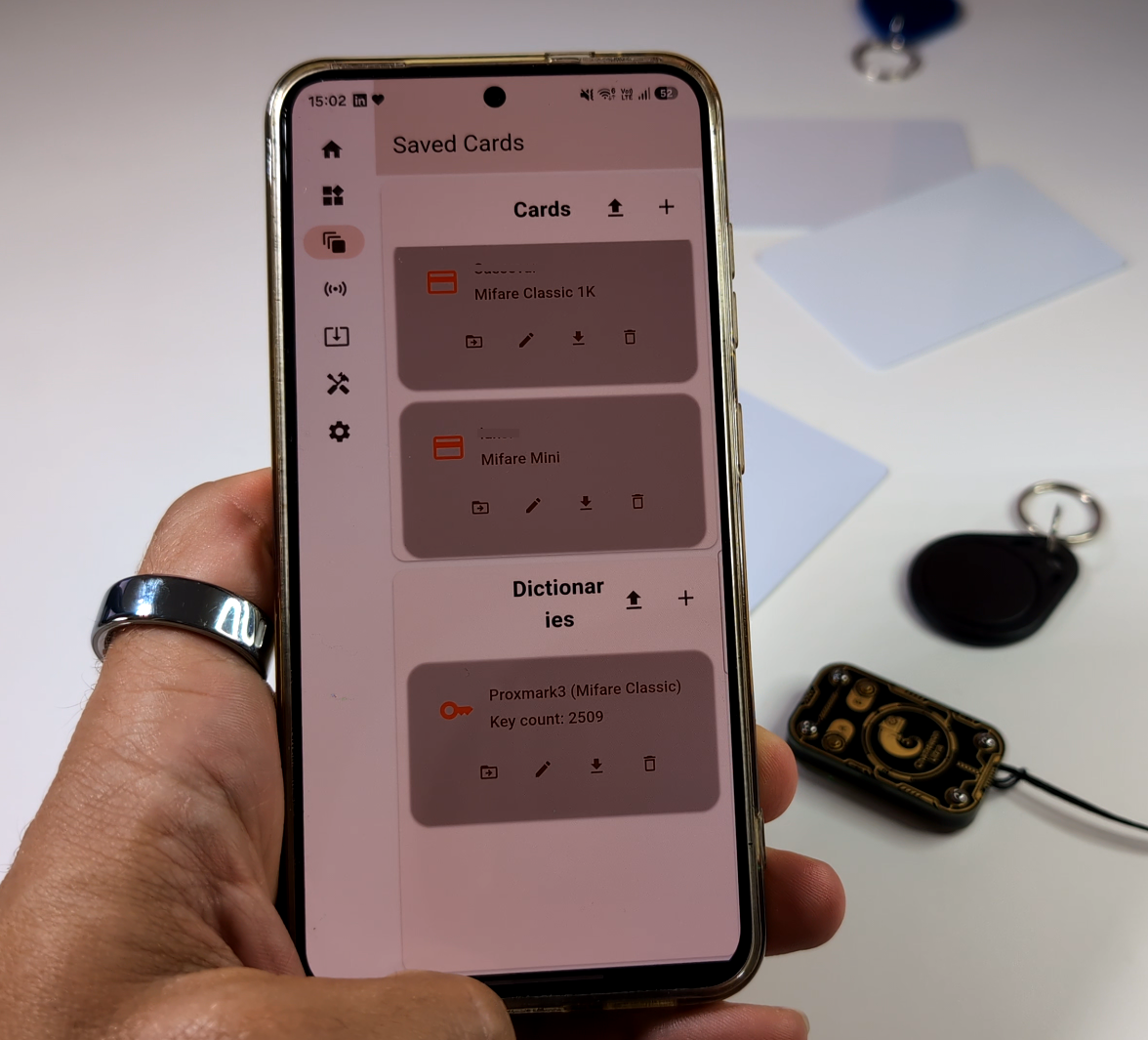
For example, you can use it to identify the technology inside your own apartment key fob, test a spare token for a home RFID lock, organize supported credentials into different slots, or experiment with reusable tags for a personal electronics project. It can also help you understand why an older gym, office or parking token may be easier to reproduce than a modern, securely protected card.
Regular users can use it with inexpensive test cards and their own RFID readers to learn how contactless technology works. They can also store several supported RFID tokens in one small device, switch between them when needed, or create a permitted backup of a simple token they own. Professionals can use it for authorized access-control testing and security research.
Understanding read, save, emulate, write and clone
These words are often used interchangeably, but they describe different operations.
Read
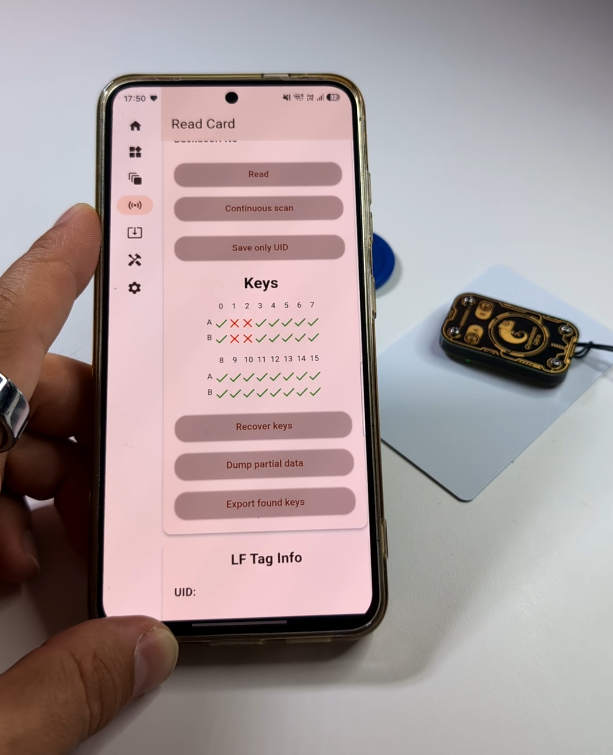
Reading means placing your own card or key fob near the Chameleon Ultra so it can identify the technology and collect any accessible information.
It may recognize the type of token, show its identification number and read unprotected data. However, detecting a card does not mean that all of its information can be accessed. Reading a card does not guarantee that it can be cloned.
Save
After reading a supported token, you can save its information in one of the Chameleon Ultra’s eight slots. Think of each slot as a space for one virtual card or key fob.
This lets you organize several supported tokens in one pocket-sized device and switch between them when needed.
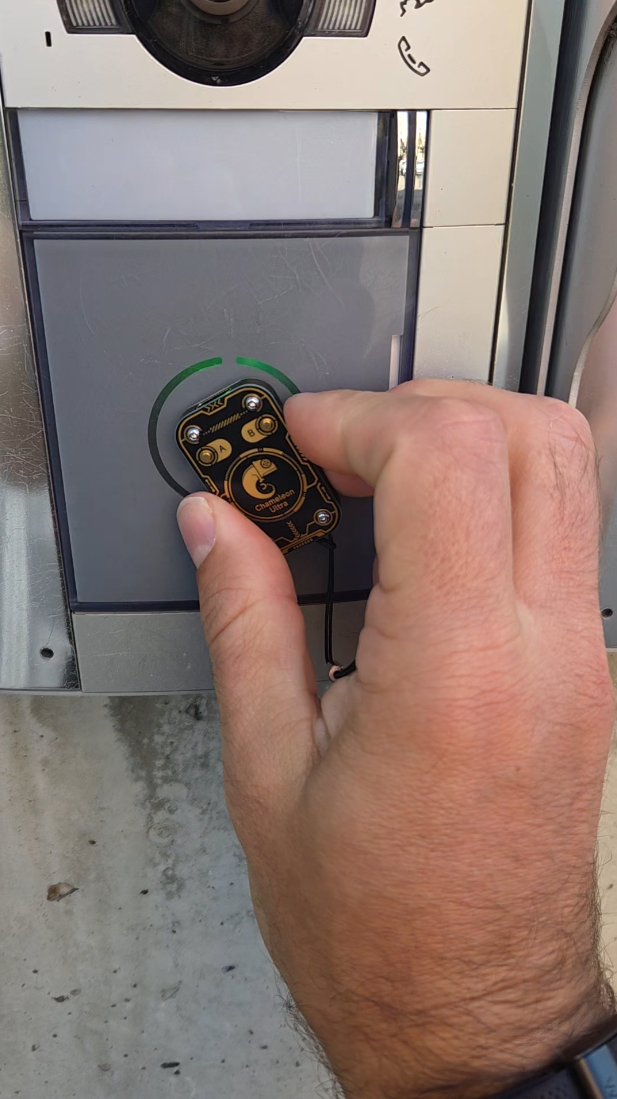
Emulate
Emulation means the Chameleon Ultra temporarily behaves like the supported token saved in the selected slot. E.g. emulate my card stored on slot 6 for gym.
Instead of carrying several compatible cards or key fobs, you can select a saved profile and present the Chameleon Ultra to your own reader.
Write
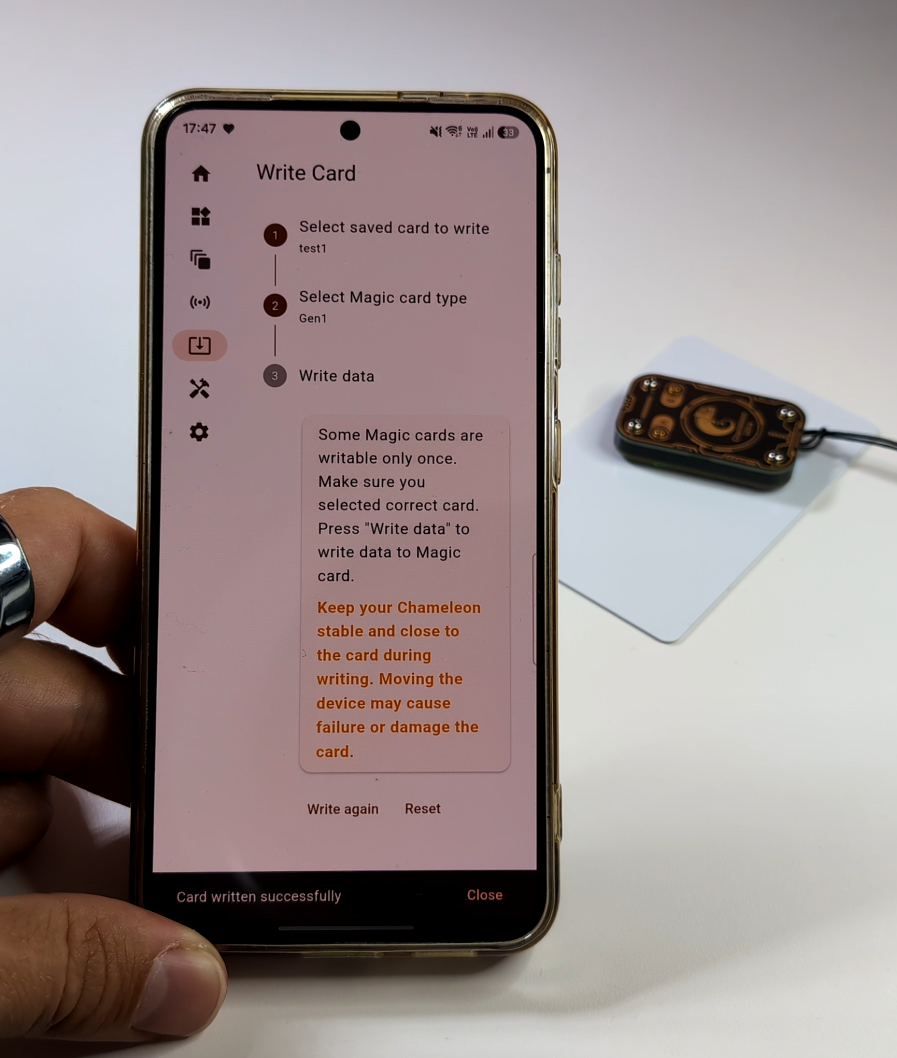
Writing means transferring compatible information to a suitable blank or rewritable RFID card or key fob.
Not every blank token can be used. It must support the correct technology, and its memory must be writable. Some cards also have protected or permanently locked areas that cannot be changed.
Clone
Cloning means creating a working duplicate of a supported token you own, either by emulating it with the Chameleon Ultra or by writing its information to a compatible blank token.
Simple, older tokens may rely mainly on a fixed identification number and can be easier to duplicate. Modern cards often use encryption, protected keys or changing responses, which means they may be detected but cannot be fully copied.
What can the Chameleon Ultra read or emulate?
The answer depends on the type of token and the firmware installed on the device.
RFID is not one universal technology. Two cards that look identical on the outside may work completely differently internally. Generally, we divide RFID into two categories: High and low frequency.
High-frequency cards and tags
At 13.56 MHz, the Chameleon Ultra focuses primarily on ISO 14443A-based technologies. Commonly referenced support includes:
- MIFARE Classic 1K, 2K and 4K
- MIFARE Ultralight
- MIFARE Ultralight C
- Selected MIFARE Ultralight EV1 variants
- Selected NTAG 21x tags
These technologies are often found in access cards, electronic locks, reusable tags and electronics projects. The Chameleon Ultra uses an MFRC522 chip for high-frequency reading and writing functions.
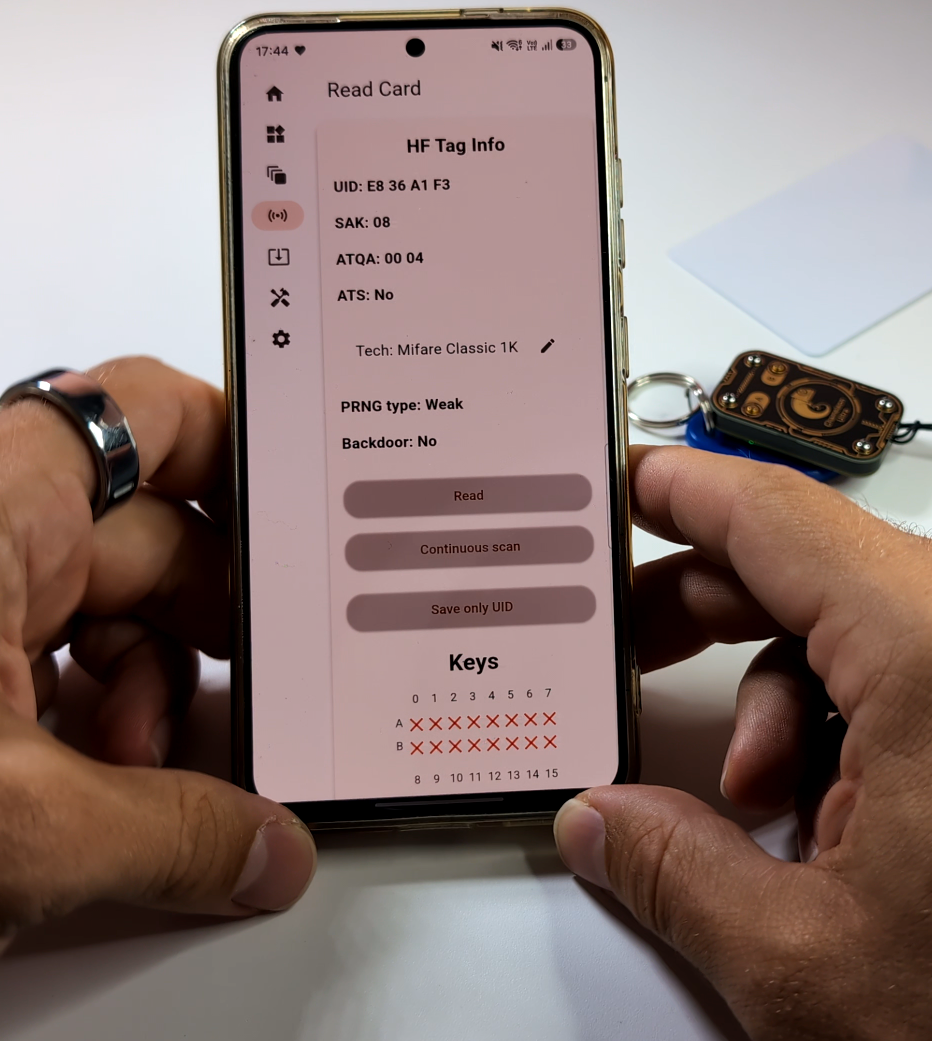
Support still depends on the individual card, its configuration and the way its memory is protected. This means that one MIFARE Classic 1K can be cloned, and the other similar looking not.
Low-frequency cards and tags
At approximately 125 kHz, supported or partially supported families may include:
- EM410x
- T5577
- HID Prox
- Indala
- AWID
- ioProx
- Keri
- Paradox
- Selected FDX-B formats
Low-frequency technologies are frequently found in older building-access systems, parking tokens, basic alarm systems and hobby electronics projects.
However, support may be different for each operation. The Chameleon Ultra might identify a format but not necessarily read, write and emulate every token using that format.
Chameleon Ultra Compatibility Table
A technology being described as supported does not mean the Chameleon Ultra can perform every operation with every card. It may identify a token but still be unable to read protected data or create a working duplicate.
| RFID technology | Identify | Read public data | Read protected data with authorized keys | Save | Emulate | Write | Clone |
| MIFARE Classic 1K, 2K and 4K | ✅ | ✅ | ✅ With correct keys | ✅ | ✅ | ✅ Compatible rewritable cards only | ⚠️ Often possible, depending on keys and reader configuration |
| MIFARE Ultralight, Ultralight C and selected EV1 | ✅ | ✅ | ⚠️ Depends on password and protection | ✅ | ✅ Selected variants | ✅ Compatible tags only | ⚠️ Depends on model, locked pages and reader checks |
| NTAG 21x | ✅ | ✅ | ⚠️ If required passwords are known | ✅ | ⚠️ Limited or model-dependent | ✅ Standard writable pages | ⚠️ Not guaranteed, especially when originality checks are used |
| EM410x and similar fixed-ID LF tokens | ✅ | ✅ ID only | Not normally applicable | ✅ | ✅ | ✅ To a compatible rewritable LF token | ✅ Often possible for simple ID-based systems |
| T5577 rewritable LF tags | ✅ | ✅ | ⚠️ If password protection is known | ✅ | ✅ Depending on programmed format | ✅ | ⚠️ Depends on the format programmed onto the tag |
| HID Prox | ✅ | ✅ Credential data | Not normally cryptographically protected | ✅ | ✅ Selected formats | ✅ To a compatible programmable token | ⚠️ Often possible for supported legacy formats |
| Indala, AWID, ioProx, Keri and Paradox | ✅ Selected formats | ✅ Decoded credential data | ⚠️ Format-dependent | ✅ | ✅ Selected formats | ⚠️ Depends on writable-token support | ⚠️ Depends on the exact format and reader |
| FDX-B animal tags | ⚠️ Selected support | ⚠️ Identification data | ❌ | ⚠️ | ⚠️ Firmware-dependent | ❌ Generally not | ❌ Not intended for creating replacements |
| MIFARE DESFire | ⚠️ May detect basic card details | ⚠️ Limited public data | ❌ Not without application keys and full support | ⚠️ Basic details only | ❌ No general full emulation | ❌ | ❌ |
| MIFARE Plus in secure mode | ⚠️ Basic detection may be possible | ⚠️ Limited | ❌ Without the required keys and support | ⚠️ | ❌ No general full emulation | ❌ | ❌ |
| HID iCLASS SE, SEOS and other modern secure credentials | ⚠️ Limited and firmware-dependent | ⚠️ Public information only | ❌ Without protected keys and compatible support | ⚠️ Limited | ⚠️ Experimental support may exist for specific technologies | ❌ | ❌ Not a general cloning solution |
| Contactless payment cards | ⚠️ May recognize the contactless interface | ⚠️ Some public card information may be visible | ❌ | ❌ Not as a complete payment credential | ❌ | ❌ | ❌ |
| Mobile wallets on phones and watches | ❌ Not as ordinary RFID tokens | ❌ | ❌ | ❌ | ❌ | ❌ | ❌ |
| UHF inventory tags | ❌ | ❌ | ❌ | ❌ | ❌ | ❌ | ❌ |
The Chameleon Ultra’s commonly documented HF support includes MIFARE Classic, Ultralight and selected NTAG technologies. Its LF support includes formats such as EM410x, T5577, HID Prox, Indala, AWID, ioProx, Keri and Paradox, but capabilities differ between identification, reading, writing and emulation.
What can it realistically clone?
The simplest credentials to reproduce are generally those that depend on a fixed, publicly transmitted identifier or unprotected data.
For example, a basic legacy system might make its access decision using a static card number. If technology is supported and that number can be correctly emulated, a reader may treat the emulation like the original credential.
Some MIFARE Classic systems may also be testable when the necessary sector keys are known or can be legitimately recovered in an authorized assessment.
What can it not read or clone?
The Chameleon Ultra is a capable tool, but it has important limitations.
It cannot copy every access card
Many modern access cards use strong cryptographic authentication. The reader does not simply ask for a fixed number. Instead, the card and reader exchange protected information and calculate responses using secret keys.
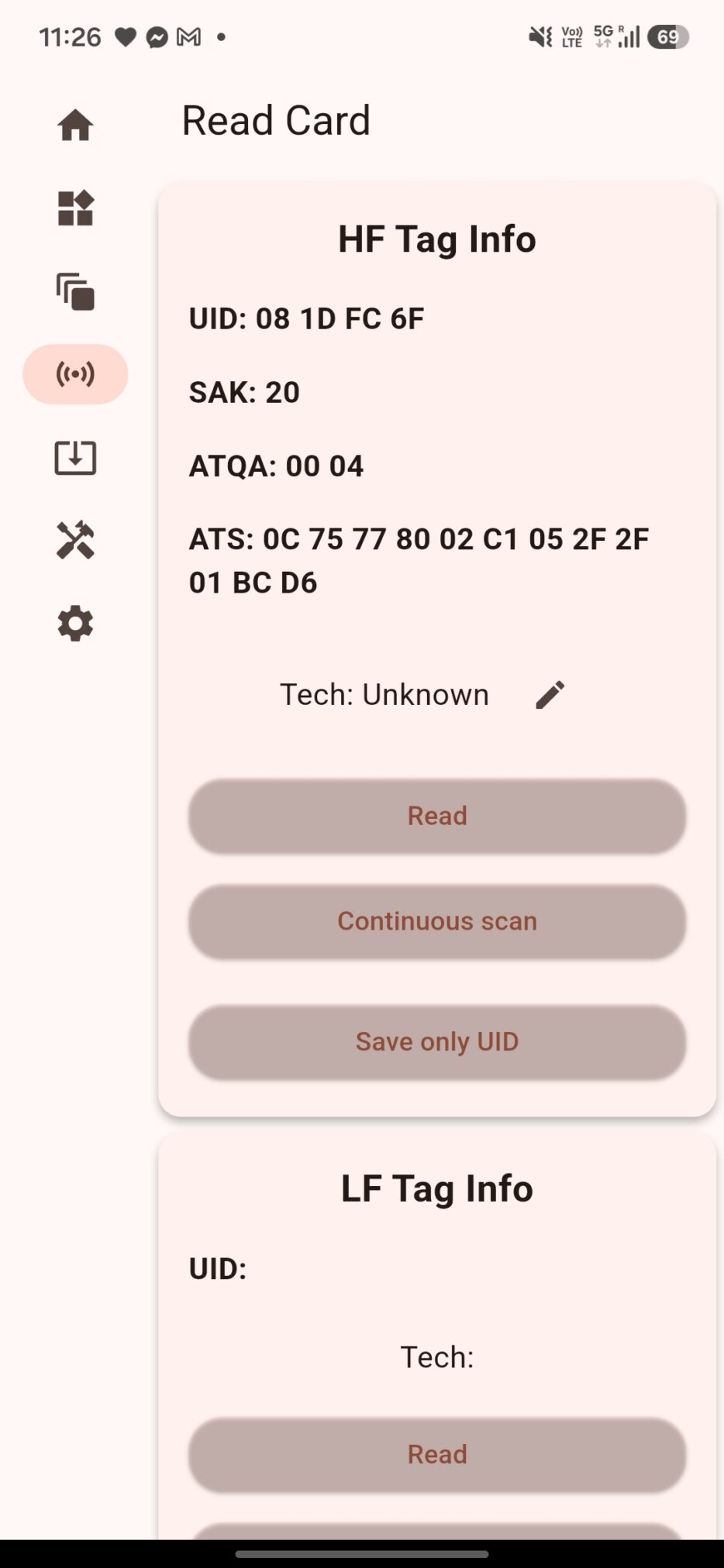
The Chameleon Ultra may recognize one of these cards or display its public identifier without being able to read or reproduce its protected functions.
This can apply to securely configured technologies such as:
- MIFARE DESFire
- MIFARE Plus
- HID iCLASS SE
- HID SEOS
- LEGIC
- FeliCa
- Java Card applications
- Other proprietary smart-card systems
For example, the image below shows a screenshot of data read from a MIFARE Plus X 2K SL3 card, where only the UID was successfully retrieved.
It is not a payment-card cloning tool
The Chameleon Ultra should not be considered a device for cloning contactless bank cards.
It cannot copy mobile wallets
Digital wallets on smartphones and smartwatches use secure hardware, tokenization and dynamically generated transaction information. They do not behave like simple fixed-number RFID key fobs.
It cannot reproduce a system’s database
Some access systems check more than the physical card. They may verify:
- Whether the user’s account is active
- Whether the credential has expired
- Where and when it was last used
- Whether it was already used at another entrance
- Whether its internal counter is correct
- Whether it has been reported lost
- Whether the reader received a correct cryptographic response
The Chameleon Ultra cannot copy an organization’s database or change the status of an account stored on a remote server.
Buttons, LEDs and card slots
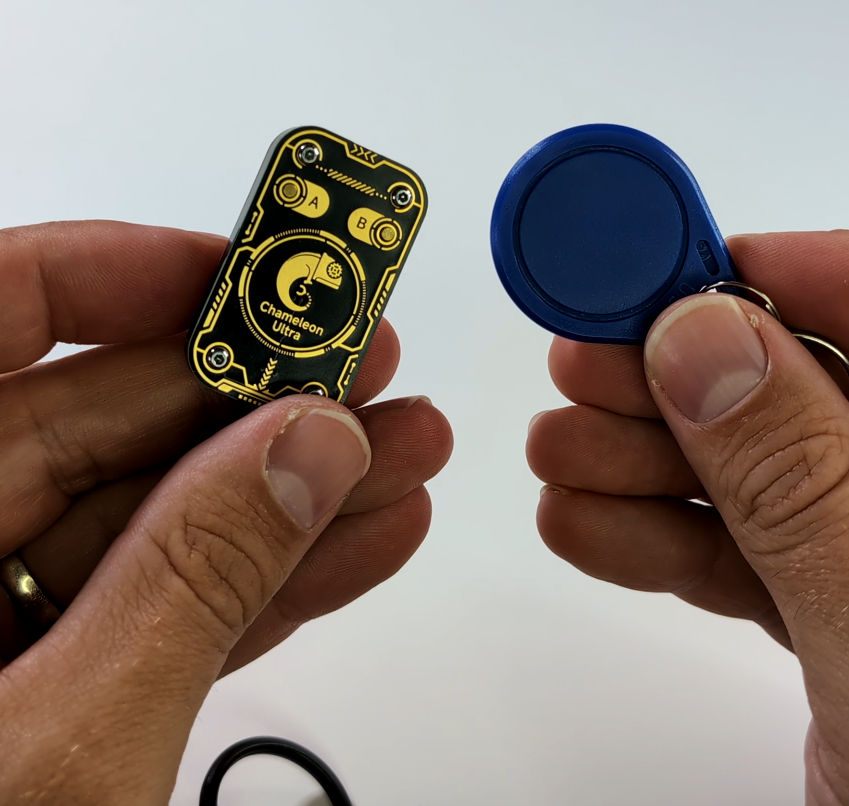
The Chameleon Ultra does not have a screen. Instead, it uses two physical buttons and a row of LEDs, while the mobile app provides more detailed information.
Eight storage slots
The device provides eight selectable slots for supported RFID profiles. The app’s Slot Manager shows which slots are enabled, which one is currently selected and what type of profile each slot contains.
The slots make it possible to keep several compatible test tokens together in one device. Giving each profile a clear name in the app makes them easier to manage.
Two buttons
The device has two physical control buttons. Button actions can be configured in the GUI mobile app, including separate actions for short and long presses. A common configuration is to move backward or forward through the enabled slots, although the exact behavior depends on the firmware and user settings.
LED indicators
The LEDs provide quick feedback about the selected slot and device activity. The product specification describes eight LEDs corresponding to eight switchable profiles. LED animations and related behavior can be changed in the device settings.
How to control the Chameleon Ultra with a mobile app
One of the device’s main advantages is that it can be managed from a mobile device over Bluetooth Low Energy.
The community-maintained Chameleon Ultra GUI is available for multiple platforms such as Android, iOS, Windows, MacOS and Linux. Its home screen shows the connected device, connection method, battery level, firmware version, used slots, current slot and reader or emulator mode.
Chameleon Ultra vs. Proxmark3 Easy vs. Flipper Zero
These devices overlap, but they are designed around different priorities.
| Feature | Chameleon Ultra | Proxmark3 Easy | Flipper Zero |
| Primary purpose | Portable RFID/NFC reading and emulation | Detailed RFID research and command-line analysis | General-purpose hardware and radio multitool |
| LF RFID | Yes, supported protocols vary | Broad LF research capabilities | Supported through a dedicated 125 kHz RFID application |
| HF RFID/NFC | Primarily selected 13.56 MHz technologies | Broad research and protocol-analysis capabilities | Built-in 13.56 MHz NFC hardware |
| Standalone use | Strong, especially after slots are configured | Limited and normally host-dependent | Strong, with screen and menu |
| User interface | Buttons, LEDs and external app | Primarily computer terminal | Built-in screen and physical controls |
| Bluetooth management | Yes | Not normally built into Easy hardware | Yes, with companion app |
| Stored profiles | Eight selectable slots | Different workflow, usually host-managed | Saved files on microSD |
| Learning curve | Moderate | High | Low to moderate |
| Best suited for | Portable credential emulation and focused RFID testing | Deep protocol experiments and laboratory research | Beginners who want RFID plus many unrelated functions |
Chameleon Ultra
A good choice if RFID and NFC are your main interests.
Its main advantages include:
- Small size
- Eight selectable slots
- Bluetooth app control
- Portable emulation and cloning
- Support for selected LF and HF technologies
- Open-source firmware and software
Its lack of a screen means you will often use the mobile app when reading cards or changing detailed settings.
Proxmark3 Easy
The Proxmark3 platform is well known among RFID researchers. It offers detailed tools for interacting with low-frequency and high-frequency technologies, but it has a steeper learning curve.
The Proxmark3 Easy is generally controlled from a computer, uConsole or rooted Android using terminal commands. Users may need to install software, configure drivers, update firmware and learn technology-specific commands.
The Easy model is a lower-cost and reduced-capability version of older Proxmark hardware. The current Proxmark website describes it as obsolete and it has been replaced by the Proxmark 3 EVO and Proxmark 3 RDV 4.
It can still be useful for learning, but beginners should compare it with newer Proxmark models before buying.
Choose a Proxmark3 when you want:
- More detailed RFID research
- Command-line access
- Greater visibility into how protocols communicate
- A device that will usually be connected to a computer
Flipper Zero
Flipper Zero is a broader portable multitool. RFID and NFC are only part of its functionality.
It has a built-in screen and menu, making it easier for beginners to use without constantly connecting to another device. Its official documentation describes support for reading, saving and emulating selected 13.56 MHz NFC cards, with supporting files stored on a microSD card.
Choose Flipper Zero when you want:
- A built-in display
- A simpler menu-based interface
- RFID alongside other hardware features
- A general-purpose learning device
Choose the Chameleon Ultra when you want a smaller and more specialized device focused mainly on RFID credential storage and emulation.
Where to buy the Chameleon Ultra
If you are interested in buying the device, the Chameleon Ultra is available from the Sapsan online shop with worldwide shipping: Buy the ProxGrind Chameleon Ultra from Sapsan
Final thoughts
The Chameleon Ultra is a compact and useful device for learning how RFID cards and key fobs work. It can identify supported tokens, store multiple profiles in eight slots and emulate certain cards, making it convenient for personal projects, education and authorized security testing.
Its most important limitation is also the most important lesson for beginners: not every contactless card can be copied. Modern credentials often use encryption, protected keys and online checks that cannot be reproduced by reading a visible identifier.
Start with inexpensive test tags and your own reader, keep saved profiles secure and never test a real access system without clear permission.